

Understanding and Fixing Saw-Pattern GPS Tracks
By Roy Lachica on . Last updated .
Have you ever looked at a GPS track and noticed it looks jagged, zigzag, or messy when zoomed in, like the teeth of a saw? This phenomenon, often called a "saw-pattern," "saw-tooth," or "zig-zag" track, is a common GPS accuracy issue where trackpoints bounce back and forth along your actual path of travel. This not only looks messy but also inflates the distance of your activity. Sometimes it can even double your recorded distance on your Garmin, Apple Watch, or other fitness tracker. This guide explains why GPS tracks go wrong and how you can fix inaccurate GPS data.
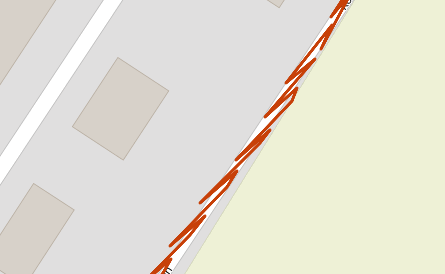
Example of a saw-pattern GPS track
What Does a Saw-Pattern Track Look Like?
Instead of a smooth line following a road or trail, a saw-pattern track shows a series of sharp, back-and-forth movements. In some cases these back and forth movements are so closely aligned to the track that they look like a single line, but when you drag the time slider you will see that you actually jump back and forth along the track. If you were running or cycling in a straight line, the GPS track might show you repeatedly jumping a few meters back and then forth again throughout the recording. This GPS drift results in a significantly longer track distance, inaccurate pace data, and an unrealistic representation of your route on Strava, Garmin Connect, or other fitness apps.
How to Detect Saw-Pattern Tracks
- Visual Inspection: The easiest way is to zoom in on your track on a map (Strava, Garmin Connect, etc.). The jagged, saw-tooth zigzag pattern is usually obvious when you inspect your GPS route closely.
- Unrealistic Speed/Pace: Your speed graph will likely show erratic spikes and inconsistent pace. The constant back-and-forth movement tricks the software into thinking you're moving much faster than you are, resulting in wrong pace calculations.
- Inflated Distance: If your recorded distance seems unusually high for the run, ride, or hike you did, a saw-pattern GPS error is a likely culprit. You might see distances that are 20-50% too long.
- Auto warning: GpxFix may auto detect and show a warning when this GPS accuracy problem happens.
What Causes Saw-Pattern Tracks?
This GPS accuracy issue is almost always caused by errors in how your GPS device (watch, bike computer, or phone) receives and processes satellite signals.
- Inherent GPS signal noise: This is the primary culprit for inaccurate GPS tracks. Every position fix has random error baked in due to tiny timing uncertainties in the satellite signals. This noise is always present; it only shows up as a zigzag when your movement is small relative to that noise.
- Multipath interference: GPS signals bounce off buildings, trees, cliff faces, or even the ground before reaching your receiver. The device receives both the direct signal and delayed reflections simultaneously, which distorts the position calculation in ways that can oscillate back and forth—a major cause of GPS errors.
- Satellite geometry (PDOP): GPS accuracy degrades when the visible satellites are clustered together in the sky rather than spread out. This can cause temporary bursts of larger positional error and poor GPS reception.
- Atmospheric delays: The ionosphere and troposphere slow GPS signals down unpredictably, adding variable error that contributes to GPS drift.
- Device/antenna movement: If the GPS watch is in a chest pocket or bouncing on your body during running or cycling, the antenna's orientation to the sky changes rhythmically. This can introduce a periodic error pattern that mimics a back-and-forth motion.
- Low update rate: If the device only records a GPS point every 5–10 seconds (common in battery-saving modes), you've moved 15–30 meters between fixes — but the noise per fix stays the same. The zigzag looks worse because the gaps between points are large enough to make the lateral scatter very visible relative to the path.
Why it looks like back-and-forth specifically (not just scatter)
Random GPS noise tends to mean one fix is ahead of true position, the next is behind — because the error has nowhere else to go along a narrow corridor like a road or trail. The constraint of the path you're on (running route, bike path, hiking trail) turns what would otherwise be 2D scatter into an apparent 1D oscillation along the direction of travel, creating that characteristic zigzag GPS pattern.
How to Fix Saw-Pattern Tracks with GpxFix
Fortunately, you don't have to live with messy GPS data. GpxFix provides tools to clean up these GPS errors and fix inaccurate tracks from your Garmin, Apple Watch, Wahoo, or other GPS devices.
Our advanced GPS smoothing algorithm is specifically designed to detect and correct saw-pattern tracks and zigzag GPS issues. When you upload your GPX file or TCX file, GpxFix can analyze the track for characteristics of multipath errors, such as unrealistic changes in direction and speed.
- Upload your GPX file, TCX file, or FIT file to GpxFix.
- Use our "Fix GPS issues" feature to correct GPS errors.
- The tool intelligently averages the erratic points, creating a new, much smoother track that more accurately follows your real path—perfect for fixing GPS drift and distance errors.
- The corrected file will have a more realistic distance and a clean appearance on the map when you upload to Strava or other fitness platforms.
How to Prevent Saw-Pattern Tracks in the first place
While you can fix a bad GPS track, it's even better to prevent GPS accuracy problems before they happen.
- Wait for a Strong GPS Lock: Before you press start on your activity, give your device a minute or two to acquire a strong signal from multiple satellites. Most GPS watches will show a "GPS Ready" or similar message with green signal bars.
- Use Multi-Band/Dual-Frequency GPS: If you're serious about GPS accuracy for running, cycling, or hiking, your next device should have this feature. Modern Garmin, Apple Watch Ultra, and other premium fitness trackers with dual-frequency GPS are game-changers for reducing multipath errors.
- Be Aware of Your Surroundings: Know that your GPS track is more likely to have accuracy problems in deep canyons, dense forests, urban areas with tall buildings, and under tree cover.
- Keep a Clear View of the Sky: If possible, wear your GPS watch on your wrist or keep your device in a location with an unobstructed view of the sky (e.g., not at the bottom of a backpack or in a pocket).
- Disable Auto-Pause for Slow Activities: For hiking or trail running where you stop frequently, "auto-pause" can sometimes cause GPS tracking issues when it resumes. Consider using the manual lap button or just letting it run continuously.
Conclusion
A saw-pattern GPS track is a frustrating but solvable problem. It's caused by the inherent challenges of receiving faint satellite signals in difficult environments, leading to zigzag GPS errors and inaccurate distance tracking. By understanding the causes of GPS drift and accuracy issues, you can take steps to get a better recording on your Garmin, Apple Watch, or other fitness tracker. And for those times when the environment wins, GpxFix is here to help you fix GPS errors, clean up the data, and get an accurate track you can be proud of—whether you're running, cycling, or hiking.
Other blog posts
- Heart Rate Stuck at One Flat Value: Causes and How to Fix It
- GPS Freezes Then Jumps: Why Your Watch Shows Impossible Speed Spikes
- TCX to GPX: Why Convert a Garmin Training Center File and How It Works
- Repairing a Workout Using a Reference GPX File
- Snap to Road: Aligning a Wandering GPS Track to the Real Route
- How Wind Turbines Can Interfere with GPS Signals
- Why Your Strava Activity Got Flagged And How to Fix It
- Why Setting the Correct Activity Type is Essential
- How to Adjust the Start Time of Your Activity
- How to Calibrate Elevation in Your GPX File
- GpxFix Blog
- How to Resample and Simplify Your GPX File
- How to Reverse the Direction of Your GPX Route
- How to Adjust Speed and Pace in Your GPX File
- How to Fix Common Strava Upload Errors
- How to Fix Incorrect Heart Rate Data in Your GPX File
- Understanding GPS Spike Zones: Identifying and Analyzing Erroneous GPS Data
- Heart Rate Data Missing or Corrupted in Your GPX File — Causes and Fixes
- How to Anonymize a GPX File Before Sharing It Online
- Why Your Elevation Gain Is Wrong And How to Fix It
- How to Fix a Workout When You Forgot to Resume a Paused Watch
- How to increase the distance of a Strava Activity after watch died
- Why you should skip the headphones on trail runs and races
- Tips for Recording Video While Racing — Camera Options, Battery Life, and More
- How to Create a Hyperlapse Video for Your GPX Route
- GPX Files with YouTube Video Segments: A New Way to Experience Routes
- To Pause or Not to Pause
- GPS & Elevation Accuracy Showdown 2026 | Garmin vs COROS vs the Rest
- Why Garmin and Strava Sometimes Show Different Distances for the Same Workout
- Why Your Activity Distance Is Wrong And How to Correct It
- Fixing Broken Strava Activities
- Why Some Workouts Cannot Be Fixed
- How to Get a GPX File onto Your Garmin Sports Watch
- How to Combine Multiple Runs Into One Activity
- How to removes GPS Spikes or extreme sudden movements
- Why We Are Introducing Subscription
- Comparing activities - a practical guide
- How GpxFix Reconstructs Indoor Track Runs — even when GPS drops out
- How to restore missing GPS data
- Crop & Cut GPX Activities — A Practical Guide
- How to Change the Distance of a Workout
- When Is It Okay, and Not Okay, to Alter Elapsed Time
- How to Change Moving Time to Match Elapsed Time
- On the Ethics Of Editing Fitness Data
- Understanding Elapsed vs. Moving Time in Strava
- How to Get Accurate GPS and Heart Rate Data